
Your GPU. One link. The world.
Share your GPU with anyone, anywhere. No accounts, no cloud, P2P.
Verifiable Open Source at GitHub ↗
NEW: now supporting NVIDIA Jetson (JetPack 6.1) + DGX Spark
Instant
Paste a link, get a terminal.
Sandboxed
Isolated container, not your host.
Global
Works in any browser, any device.
Free
No fees, P2P, you set the price.
How it works
Before you start: RunSnack runs in Docker. If you don't have it, install Docker Desktop first (free) and make sure it's running — whale icon in system tray.
-
1
Download the installer for your OS
-
2
For Windows - Run it in PowerShell:
powershell -ExecutionPolicy Bypass -File snackup.ps1For Linux & macOS (CPU-only on Mac - Docker can't reach the GPU) - Run it in Terminal:
chmod +x snackup.sh && ./snackup.shRunSnack quick config after execution:
-
Answer: CPU cores, RAM, optional schedule — press Enter for defaults. First run gets a ~1.4 GB image (takes minutes — normal). After that, sessions start instantly.
-
3
Share the link
-
The script prints a link once everything's ready. Anyone who opens it gets an instant GPU terminal in their browser. Still not clear? Watch our 30-sec YouTube Reel↗
Sharing with a second, different person afterwards? Power off for 10 seconds in between so the GPU's memory is cleared, or see commands in the security model↗
Why not just rent a GPU?
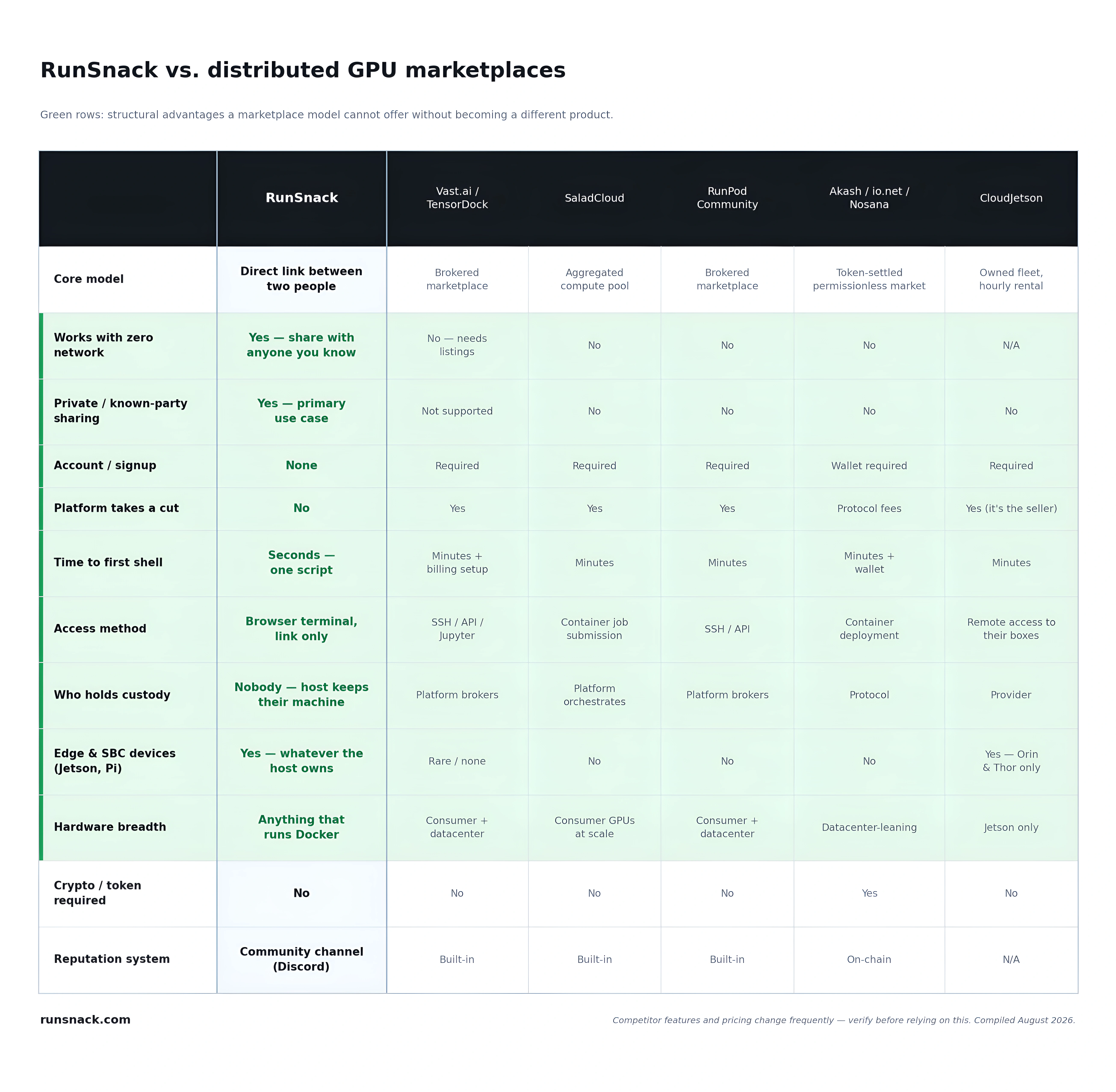
You can. Vast.ai, Salad, Akash and RunPod all rent you a stranger's GPU by the hour, and if that's what you need, they're good at it. RunSnack solves a different problem: getting someone specific onto your hardware, right now. A student on the lab's GPU. A maintainer on your Jetson to reproduce a bug. A collaborator on the robot in the next building. No account for them to create, no listing to publish, no marketplace to wait for — just a link. That's why it works with a network of one.
What RunSnack deliberately doesn't do
No escrow, no payments, no SLA. If money changes hands, that's between you and the other person and we're not involved. Sessions are sandboxed in Docker, but Docker is a sandbox rather than a hypervisor — and the GPU is passed through whole, with no MIG or vGPU partitioning, and read the before you share with anyone else.